
Desktop
Nerv is the computer you sit in front of, not only the one you deploy to. Everything you see is built by Nerv on musl, from the compositor and the terminal to the colours and the typeface.
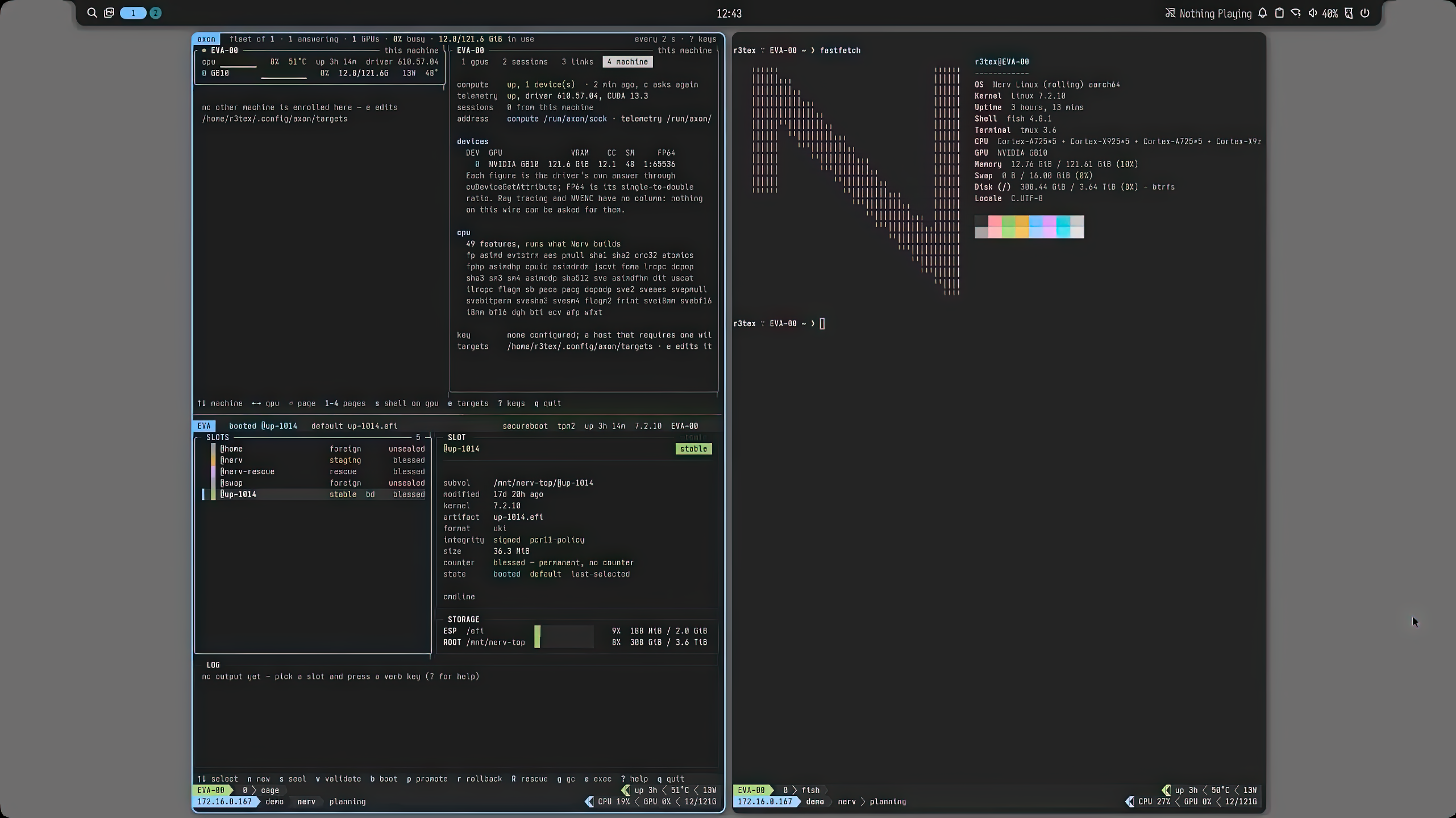
A minimalist desktop for power users
The compositor is Umbriel, built on wlroots. Noctalia draws the bar, the launcher, notifications and the wallpaper, and foot is the terminal. It is all Wayland, with nothing on screen you did not ask for, and a program that crashes takes down its own connection to the GPU, never the desktop.
Myelin, a colour scheme that was designed
You read your screen for hours a day, and most colour schemes were picked by eye on one monitor. They look pleasant and fail the people who need them most: dim comments vanish in daylight, one accent shouts while another disappears, and the light mode is an afterthought nobody can read. OneDark, one of the most popular schemes there is, draws its comments at 2.3:1, under the 3:1 floor for an interface border, let alone text. Swap in a white background and every one of its accents falls between 1.7:1 and 3.1:1.
Myelin keeps OneDark's hues and solves everything else from contrast targets. Every pair of colours is checked twice: against WCAG 2, the measure accessibility law is written against, and against APCA, which models how people actually perceive contrast and is much stricter about light text on dark grounds. All seven accents sit at exactly the same perceived contrast in both modes, so no hue shouts over another and syntax highlighting reads as structure instead of noise. The ten greys are exactly neutral, so nothing casts warm or cool against an accent. Blue is the interface colour and red is reserved for the brand and destructive actions, because a red switch reads as an error.
One palette covers the terminal, the kernel console, Neovim, graphical applications and the browser. Every program Nerv ships takes its colours from it, and the build refuses any file that carries its own copy of a colour. This website is Myelin too.
- red
- orange
- yellow
- green
- cyan
- blue
- magenta
| Dark mode, on its own background | OneDark | Myelin |
|---|---|---|
| Body text, APCA | Lc 56, under the floor for body text | Lc 85 |
| Comments and dim text | 2.3:1 | at least 4.5:1 on every ground |
| Red | 4.4:1 | Lc 61, like every other accent |
| Accents in light mode | 1.7–3.1:1 | Lc 61, and running text at 4.5:1 |
Ashinoko, a typeface for people who read code all day
Ashinoko is generated, not drawn. Iosevka is a parametric typeface: a build plan chooses every glyph's shape, the weights, the widths and the metrics, and the build turns that plan into outlines. Ashinoko is that plan, kept in Nerv's tree and rebuilt like any other package, so every decision about a letter is written down with its reason and can be changed with one line.
Those decisions are about telling characters apart at a glance. Zero is slashed and never mistaken for O. One, lowercase l and capital I each have a distinct shape. D is shaped so it never reads as O at small sizes, where TODO in many fonts turns into TOOO. The m has a short middle leg so its strokes never blend into a block. Stock Iosevka is narrow and spiky; Ashinoko is wider and calmer, for long reading rather than for fitting the most columns on screen.
One plan produces four families with the same proportions: Sans Mono for the terminal, editor and console, Sans for the desktop, Serif for documents and the handbook, and Serif Mono with slab serifs. The Mono face is also compiled into the kernel, so the first line printed at boot is already in Ashinoko.
0O 1lI rn m TODO {} () [] => != <=
Ashinoko Sans — The quick brown fox jumps over the lazy dog
Ashinoko Serif — The quick brown fox jumps over the lazy dog
A modern unix userland
The interactive defaults are fast Rust tools, while /bin/sh is dash and the classic commands stay where scripts expect them, so nothing you already wrote changes.
Nerv stands out among Linux distributions in shipping every core utility in POSIX.1-2024 out of the box.
| Instead of | Nerv ships | What you get |
|---|---|---|
bash | fish + starship | autosuggestions, syntax highlighting, a fast prompt |
GNU coreutils | uutils | the same commands, rewritten in Rust |
ls | eza | git status and tree views |
cat | bat | syntax highlighting and paging |
grep | ripgrep | recursive by default, respects .gitignore |
find | fd | short invocations, respects .gitignore |
sed | sd | plain regular expressions, no escaping maze |
cd | zoxide | jump to directories by how often you use them |
history | atuin | searchable shell history across sessions |
top | btop | per-core, per-process and GPU history |
ps | procs | search and tree views |
du / df | dust / duf | sorted, readable disk usage |
diff | delta | syntax-aware side-by-side diffs |
time | hyperfine | repeated runs with statistics |
man | tealdeer | short, practical examples |
curl | xh | HTTP with a friendlier command line |
vim | neovim | configured with LSP and tree-sitter |
Install anything
The base system is built on musl, but you are not limited to what Nerv builds. dnf install reaches the whole Fedora package collection, and pip wheels, CUDA toolkits and vendor binaries run on a glibc runtime that sits beside the base without a container or a chroot. PyTorch and your own CUDA code run unmodified, and a notebook that allocates too much GPU memory gets an out-of-memory error at its limit instead of taking the machine down.